
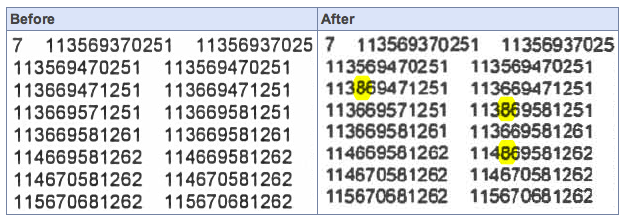
German researcher D. Kriesel discovered that certain characters are being modified by Xerox copiers, when documents are scanned to PDF. In this example, the meanings of numeric figures were altered when the Xerox system changed out the number “6” and with the number “8” in multiple locations. The cause appears to be faulty compression settings, causing similar-looking characters to be overlaid and repeated in an effort to reduce the size of the scanned files.
Over the past week, there has been a great deal of buzz in the IT community about a discovery by a researcher in Germany that certain Xerox Workcentre copy/scan stations are altering the content of documents scanned to PDF. In particular, attention has been focused on the Xerox WorkCentre 7535 and 7556 models. Kriesel found that “patches of the pixel data are randomly replaced in a very subtle and dangerous way. In particular, some numbers appearing in a document may be replaced by other numbers when it is scanned.”
According to Xerox, a software update is coming to address the issue. From their official statement:
We continue to test various scanning scenarios on our office devices, to ensure we fully understand the breadth of this issue. We’re encouraged by the progress our patch development team is making and will keep you updated on our progress here at the Real Business at Xerox blog.
We’ve been working closely with David Kriesel, the researcher who originally uncovered the scenario, and thank him for his input which we are continuing to investigate. As we’ve discussed with David, the issue is amplified by “stress documents,” which have small fonts, low resolution, low quality and are hard to read. While these are not typical for most scan jobs ultimately, our actions will always be driven by what’s right for our customers.
There are still points of contention, however. Xerox claims the problem can be resolved by restoring the copiers to factory default settings. Kriesel, however, has been able to show that documents still get mangled even when following these instructions. Clearly, Xerox has a lot of to do… not just to fix the technical issues, but to regain the confidence of their users, that they can trust their copiers to make faithful reproductions.
What’s this all about, and why is it important?
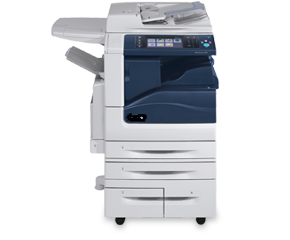
A Xerox Workcentre copy/scan/print station
In the past couple of decades, the office copier has evolved into something a lot more complex. No longer do these machines just spit out paper copies of the documents fed to them. They now serve as feature-laden printing and scanning workstations. In addition to just making paper duplicates, you can use the modern copier as a bulk laser printer to blast out hundreds of copies of a document from your computer. Or, you can take a paper document and scan it into a digital file, often a PDF document, that can then be stored or e-mailed.
The last part is where we have our problem. In many office settings, the idea of reducing the amount of paper lying around is a desirable goal, and being able to replace old paper documents with a PDF scan makes sense. Of course, the expectation is that the PDF will exactly match the original paper document.
There’s just one problem: an absolute, exact copy would mean generating large, uncompressed images, resulting in huge PDF files that would be difficult to pass around in e-mail attachments, and cost a lot of money to store on large hard drives for archival purposes. For many corporate settings, this would be a deal-breaker. So, to keep file sizes down, nearly all of these copy systems (not just Xerox) compress the scanned images, using the industry-standard JBIG2 algorithm.
JBIG2 does its “magic” by finding pieces of an image that are identical (or, very close to identical), and using the same piece of data to represent all parts of the image that it feels looks similar enough. This can be especially useful when working with text documents. Letters, numbers and words that repeat often can all share the same small data fragment, rather than every individual letter and number being uniquely described, every time they appear on a page.
However, this method of compression can also cause problems if not implemented carefully. If the software encoding the JBIG2-compressed image isn’t configured well enough to figure out the difference between two similar-looking characters – such as the numbers “6,” “8” and “9” for example, or perhaps the uppercase “O” and the number “0” – then it’s possible that it might substitute the wrong data fragment for each character… in effect, changing those subtly-different-looking characters, and the meaning of that word or figure.
This can have huge ramifications when the character changes mean substantial changes in meaning. Financial documents, contact information, or any other type of critical data aren’t tolerant to having their meaning changed, potentially causing all kinds of critical, maybe catastrophic errors.

